*Updated August 3, 2026*
Old phones, laptops, televisions, chargers, printers, and other electronic devices should not be placed in your household trash or curbside recycling bin. Many contain batteries, metals, glass, plastics, and potentially hazardous materials that require specialized handling.
Fortunately, learning how to recycle electronics is fairly straightforward. The basic process is to determine whether the device can be reused, remove your personal data, separate any batteries that require special handling, and take the item to an approved electronics recycling program.
Taking these steps matters. The world generated approximately 62 million metric tons of electronic waste in 2022, but only 22.3% was documented as formally collected and recycled. Global e-waste generation is projected to reach 82 million metric tons annually by 2030.
Electronics Recycling Quick Start
Need to clear out a drawer or closet full of old electronics? Start here:
- Check whether the device still works. Repair, sell, trade in, or donate usable electronics before recycling them.
- Back up anything you want to keep. Save photos, documents, contacts, and account information.
- Sign out and erase your data. Remove SIM cards and memory cards, disconnect accounts, and follow the manufacturer’s factory-reset or secure-erasure instructions.
- Remove batteries when it is safe to do so. Batteries may need to be recycled separately.
- Find an approved collection option. Check municipal programs, retailers, manufacturers, battery collection sites, or certified electronics recyclers.
- Confirm the rules before visiting. Accepted items, limits, fees, and residency requirements vary by location.
Important: Never place lithium-ion batteries or devices containing lithium-ion batteries in household trash or curbside recycling. These batteries can be damaged during collection and sorting, creating a serious fire risk.
What Electronics Can Be Recycled?
Most devices with a plug, battery, charging port, circuit board, or electronic display contain recyclable materials. However, that does not mean every recycling location accepts every device.
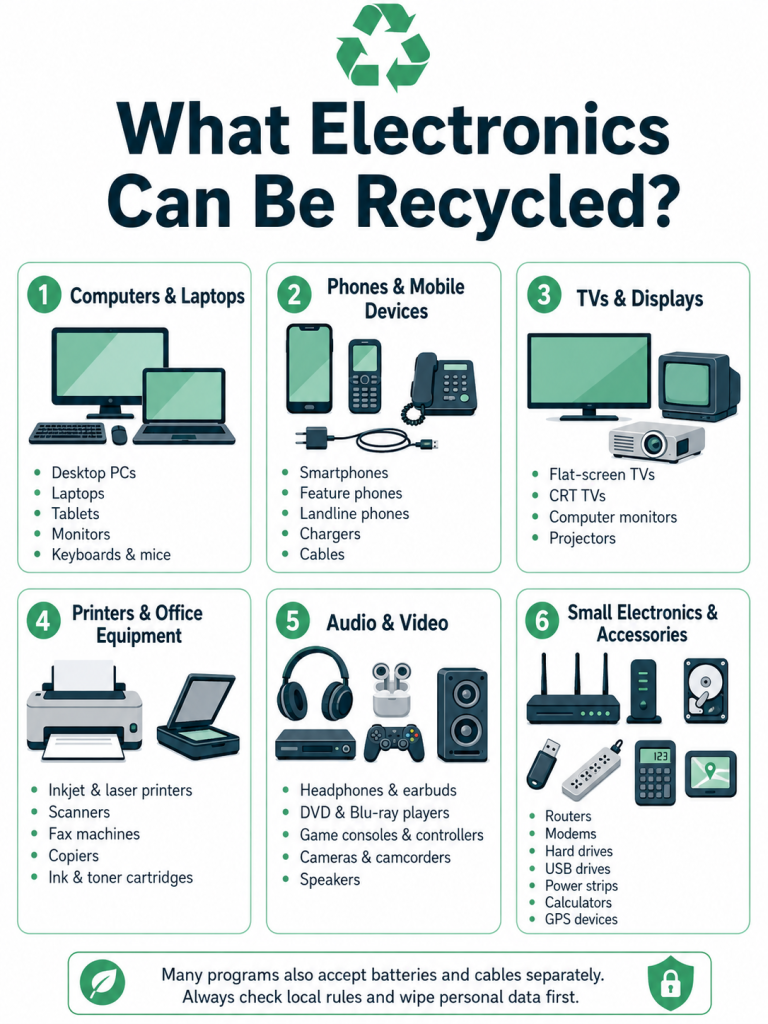
| Commonly recyclable electronics | Items that may require special arrangements |
|---|---|
| Cellphones and smartphones | Televisions |
| Laptops and tablets | CRT televisions and monitors |
| Desktop computers | Large appliances |
| Computer monitors | Refrigerators and air conditioners |
| Keyboards and mice | Devices with swollen or damaged batteries |
| Printers and scanners | Smoke and carbon-monoxide detectors |
| Routers and modems | Medical electronics |
| Cameras | Solar panels |
| Gaming consoles and controllers | Commercial quantities of equipment |
| Speakers and headphones | recalled products |
| Chargers, cords, and cables | |
| External hard drives | |
| Small electronic toys | |
| Smartwatches and fitness trackers |
Always search for your specific item before traveling to a drop-off point. A facility that accepts computers may not accept televisions, batteries, appliances, or equipment from businesses.
For more device-specific instructions, see our guides to:
- Recycling old cellphones
- Recycling laptops
- Recycling televisions
- Recycling hard drives
- Recycling household batteries
How to Recycle Electronics in Six Steps
1. Decide Whether to Reuse, Donate, Sell, or Recycle
Recycling is not always the best first choice. If an electronic device still works and can be used safely, extending its life is usually preferable to immediately breaking it down for materials.
Consider these options in order:
- Continue using or repair it. A replacement battery, additional memory, software update, or inexpensive repair may extend the device’s life.
- Sell or trade it in. Phones, tablets, computers, gaming systems, cameras, and other recent devices may retain resale value.
- Give it to someone you know. A working device may be useful to a family member, student, or neighbor.
- Donate it. Some schools, nonprofit organizations, community programs, and refurbishers accept usable electronics.
- Recycle it. Recycling is the right choice when a device is broken, obsolete, unsafe, or no longer suitable for reuse.
Contact an organization before donating. Many nonprofits cannot use obsolete computers, cracked screens, missing chargers, locked devices, or equipment that requires expensive repairs. Donating an unusable product can transfer the disposal cost to the organization you intended to help.
2. Back Up Your Files and Disconnect Your Accounts
Before selling, donating, or recycling a device, save any information you want to keep.
Depending on the device, that may include:
- Photos and videos
- Documents
- Contacts
- Text messages
- Passwords
- Browser bookmarks
- Application data
- Two-factor authentication settings
- Software licenses
- Game saves
- Tax or financial records
Next, sign out of your accounts and disconnect the device from services such as cloud storage, device-location tools, mobile-payment applications, password managers, and smart-home systems.
For phones and tablets, remove the SIM card and any removable memory card. Also disable activation locks or device-location features that could prevent a new owner or refurbisher from using the device.
3. Erase Personal Data Before Recycling Electronics
Electronics may contain far more personal information than is immediately visible. Even an old printer, gaming console, digital camera, smart television, or router may retain account credentials, network information, documents, or usage history.
The Cybersecurity and Infrastructure Security Agency recommends following the device manufacturer’s instructions for securely wiping a device before it is sold or recycled.
Phones and tablets
For a phone or tablet:
- Back up your information.
- Sign out of cloud and manufacturer accounts.
- Disable activation locks and device tracking.
- Remove the SIM card and removable memory card.
- Use the device’s factory-reset or “erase all content” function.
- Confirm that the device restarts at its initial setup screen.
Computers
For a desktop or laptop:
- Back up the files you need.
- Sign out of cloud services, browsers, and licensed software.
- Deauthorize the computer from services that limit the number of connected devices.
- Use the operating system’s reset, erase, or secure-reinstallation function.
- Follow the computer or drive manufacturer’s current sanitization instructions when additional security is needed.
Simply dragging files into the recycle bin does not securely erase them.
For highly sensitive information, business equipment, or a hard drive that cannot be accessed, consider using a certified data-destruction provider. Ask whether the provider offers documented data sanitization, physical destruction, asset tracking, or a certificate of destruction.
Do not attempt to smash, drill, burn, or disassemble data-storage devices unless you have the appropriate equipment and training. Improvised physical destruction can cause injury and may expose you to sharp components, dust, or damaged batteries.
For more information, read our complete hard-drive recycling and disposal guide.
4. Remove and Prepare Batteries Safely
The EPA advises consumers to remove batteries from electronics when possible because batteries may need to be recycled separately. Lithium-ion batteries and devices containing them should never be placed in household garbage or curbside recycling carts.
For removable batteries:
- Follow the device manufacturer’s removal instructions.
- Avoid bending, puncturing, crushing, or opening the battery.
- Place tape over exposed terminals when instructed by the collection program.
- Keep individual batteries separated to reduce the possibility of contact and sparking.
- Transport them in a nonmetal container or individual bags when required.
- Check whether the collection site accepts that specific battery chemistry and size.
Do not force out a battery that is glued in place or difficult to access. Many phones, tablets, earbuds, smartwatches, and ultrathin laptops have built-in batteries and should be recycled as complete devices.
A swollen, leaking, punctured, overheated, or recalled battery requires special care. Keep it away from heat and combustible materials, avoid shipping it through the mail, and contact your local household hazardous-waste program, fire department’s nonemergency line, or an appropriate battery recycler for instructions.
See our battery recycling guide for information about alkaline, lithium-ion, rechargeable, and automotive batteries.
5. Find Where to Recycle Electronics Near You
Electronics recycling programs are usually local. The best option depends on your ZIP code, the type and condition of the device, and whether the equipment comes from a household or business.
Local government recycling programs
Start with your city, county, or municipal solid-waste department. Local programs may offer:
- Permanent electronics drop-off centers
- Household hazardous-waste facilities
- Seasonal collection events
- Curbside appointments for large appliances
- Television and monitor collection
- Resident-only recycling programs
- Special business recycling events
Search for “[your city or county] electronics recycling” or visit your state environmental agency’s website.
Earth911 recycling search
The Earth911 Recycling Search allows you to search by material and ZIP code. Its directory includes recycling facilities, municipal programs, donation locations, and mail-in options. The EPA also lists Earth911 as one resource consumers can use to locate recycling opportunities.
Verify the listing directly with the recycler before visiting. Directory information, accepted products, hours, and fees can change.
Call2Recycle battery and cellphone locations
Use the Call2Recycle location finder to search for participating battery and cellphone collection points.
Collection rules can differ by location. Check the accepted battery types, size limits, packaging requirements, and whether the site accepts damaged batteries before dropping anything off.
Retail electronics recycling
Several national retailers operate electronics collection or trade-in programs.
Best Buy: Participating Best Buy stores accept many computers, phones, accessories, televisions, and other electronics. Some items are accepted free, while others may carry a fee. Product limits and state restrictions apply, particularly for televisions and monitors. Check the retailer’s current recycling list and your local store’s rules before visiting.
Staples: Staples offers in-store recycling for many office and consumer electronics, along with programs for batteries, ink, toner, and technology trade-ins. Some services are free while others may have a fee, so review the current accepted-item list and program terms.
Retail programs are convenient, but they are not universal disposal sites. Stores may reject large appliances, damaged batteries, recalled products, contaminated equipment, commercial quantities, or products that are not included in the program.
Manufacturer trade-in and take-back programs
Check the manufacturer’s website before recycling a device elsewhere. Manufacturers may offer:
- Trade-in credit
- Free mail-back recycling
- In-store collection
- Packaging and shipping instructions
- Recycling for devices with no resale value
For example, Apple Trade In provides trade-in options for qualifying equipment and free recycling for Apple products and certain related electronics that do not qualify for credit.
Programs change, so confirm eligibility, data-removal responsibilities, shipping restrictions, and accepted accessories directly with the manufacturer.
Certified electronics recyclers
For large quantities, business equipment, data-sensitive devices, unusual electronics, or products rejected by retail programs, search for a certified e-waste recycler.
The EPA recognizes two accredited electronics recycling certification standards:
- R2, administered by Sustainable Electronics Recycling International
- e-Stewards, administered by the Basel Action Network
Certified facilities are independently audited against requirements involving environmental practices, worker health and safety, data security, reuse, recycling, and the management of downstream vendors.
Use the official R2 Certified Facility Directory or e-Stewards Recycler Directory to locate a facility.
6. Confirm the Facility’s Rules
Before transporting your electronics, contact the collection program and ask:
- Is this exact device accepted?
- Is the program limited to local residents?
- Is proof of residency required?
- Is there a drop-off fee?
- Are there daily or household limits?
- Must batteries be removed?
- Are damaged batteries accepted?
- Are televisions or CRT monitors accepted?
- Does the program accept business equipment?
- Is data destruction included?
- Are appointments required?
- What happens to items after collection?
Never leave electronics outside a closed facility or beside a donation bin. Besides being illegal in many places, abandoned devices can be damaged by weather, expose personal data, or create battery and fire hazards.
Why Certified E-Waste Recyclers Matter
Electronics recycling may involve several companies. One facility may collect and sort devices, another may refurbish reusable products, and additional downstream processors may recover metals, plastics, glass, batteries, or other components.
Certification helps establish standards for how those materials and devices are handled throughout the process.
R2 certification
The R2 standard covers the reverse electronics supply chain from reuse through end-of-life recycling. Its requirements address data security, environmental protection, worker health and safety, equipment testing, reuse, material processing, and oversight of downstream vendors.
e-Stewards certification
The e-Stewards standard also addresses responsible reuse, recycling, data security, worker protection, and downstream management. It places particular emphasis on international hazardous-waste controls and alignment with the Basel Convention’s rules governing cross-border waste shipments.
Both certifications can provide more assurance than an unverified claim that a company “recycles responsibly.” However, certification applies to specific facilities and activities, not necessarily every location operated by a company. Confirm that the facility receiving your equipment is included in the certification directory.
Electronics Recycling Laws Vary by State
There is no single consumer electronics recycling system covering every state and device.
The EPA currently reports that 25 states and the District of Columbia have electronics recycling laws. Depending on the state, those laws may create manufacturer-funded collection programs, restrict electronics from landfills, regulate certain displays, or establish special handling requirements.
Local differences can affect:
- Which products are covered
- Whether recycling is free
- Who pays for collection
- Whether televisions are accepted
- Whether electronics may be placed in the trash
- Whether a program serves households, businesses, or both
- How batteries and CRT displays must be handled
Check your state environmental agency and local solid-waste authority rather than assuming that advice for another state applies where you live.
What Happens to Recycled Electronics?
The exact process differs by facility, but responsibly collected electronics generally move through several stages.
Inspection and sorting
Workers identify the equipment, its condition, and whether it can be safely reused. Products may be separated by device type, battery type, display technology, or material-processing requirements.
Reuse and refurbishment
Working equipment may be tested, cleaned, repaired, upgraded, or harvested for reusable components. Devices intended for reuse should have their data sanitized and their functionality verified.
Data sanitization
Data-bearing devices such as computers, phones, tablets, servers, printers, and hard drives may undergo logical erasure or physical destruction, depending on their condition and the recycler’s process.
Dismantling
Devices that cannot be reused are dismantled. Batteries, circuit boards, displays, cables, plastics, metals, and other components are separated for specialized processing.
Material recovery
Recycling processors may recover steel, aluminum, copper, precious metals, plastics, glass, and battery materials for use in new products.
Hazardous-material management
Components containing lead, mercury, refrigerants, batteries, or other regulated materials require controlled handling. This is one reason electronics should not be mixed with household trash or ordinary curbside recyclables.
Why Recycle Old Electronics?
Responsible electronics recycling provides several related benefits.
It keeps problem materials out of ordinary waste systems
Electronics can contain lead, mercury, cadmium, batteries, refrigerants, and other materials that should not be crushed, burned, or buried with household waste.
It recovers useful materials
Circuit boards, wires, batteries, frames, and other components contain metals and materials that may be returned to manufacturing rather than discarded.
It reduces battery-fire risks
Lithium-ion batteries can ignite when crushed or damaged in garbage trucks, transfer stations, and material-recovery facilities. Using the correct collection program protects waste workers, equipment, and surrounding communities.
It extends product life
Selling, donating, repairing, and refurbishing electronics can delay the environmental impacts associated with manufacturing a replacement and keep useful equipment in circulation.
It improves accountability
Using an established collection program or certified recycler gives you a clearer path for asking how equipment, personal data, batteries, and downstream materials will be managed.
Electronics Recycling Checklist
Before giving up possession of an electronic device, confirm that you have:
- Backed up important files
- Transferred contacts and authentication accounts
- Signed out of personal and business accounts
- Disabled device tracking and activation locks
- Removed SIM and memory cards
- Followed the manufacturer’s data-erasure instructions
- Removed batteries when safe and required
- Checked for swelling, leaking, or physical damage
- Confirmed that the recycler accepts the item
- Reviewed any limits, fees, or residency rules
- Recorded serial numbers for business or insurance purposes
- Requested data-destruction documentation when needed
Frequently Asked Questions About Electronics Recycling
Can I put electronics in my curbside recycling bin?
Generally, no. Electronics, cords, batteries, and small appliances can damage sorting equipment, create fire risks, and contaminate otherwise recyclable materials. Use a designated electronics collection program unless your local recycling authority specifically instructs you otherwise.
Do I need to wipe my computer or phone before recycling it?
Yes. Back up your files, sign out of your accounts, remove SIM and memory cards, and follow the manufacturer’s instructions for securely erasing or resetting the device. Do this even when a recycler says it provides data destruction.
Is electronics recycling at Best Buy free?
Many accepted items can be recycled for free, but some products may carry a fee. Limits and restrictions vary by product, store, and state. Televisions and monitors are especially likely to have fees or location-specific rules. Check Best Buy’s current recycling information before visiting.
Can I recycle a broken television?
Many municipal programs, electronics recyclers, and participating retailers accept broken televisions. However, televisions—especially older CRT models—frequently have fees, limits, or special collection requirements. Confirm acceptance before transporting one.
Can lithium-ion batteries go in the trash?
No. Lithium-ion batteries and devices containing them should not be placed in household garbage or municipal recycling bins. Take them to an appropriate battery or electronics recycling location.
What should I do with a swollen battery?
Stop using and charging the device. Do not puncture, crush, mail, or place the battery in a collection box intended only for undamaged batteries. Keep it away from heat and flammable materials, then contact an appropriate household hazardous-waste or battery program for local instructions.
Is it better to donate or recycle electronics?
Donate, sell, repair, or trade in electronics that are functional, secure, and useful. Recycle devices that are broken, unsafe, obsolete, or unsuitable for reuse. Confirm that the receiving organization actually needs and accepts the equipment.
Where can I recycle electronics near me?
Check your city or county solid-waste department, state environmental agency, Earth911, participating retailers, manufacturer take-back programs, and the official R2 and e-Stewards recycler directories. Search using both the device type and your ZIP code, since not every facility accepts every product.
What does a certified e-waste recycler do?
A certified recycler has been independently audited against an electronics recycling standard. In the United States, the EPA recognizes the R2 and e-Stewards certification programs. Their requirements address areas such as environmental management, worker protection, data security, reuse, recycling, and downstream handling.
Recycle Your Old Electronics Responsibly
Electronics recycling does not have to be complicated. Start by determining whether the device can be reused, protect your personal data, handle batteries separately, and verify the collection program before dropping anything off.
The most important rule is simple: do not place unwanted electronics or lithium-ion batteries in ordinary trash or curbside recycling. A few minutes spent locating the appropriate program can protect your information, reduce fire and pollution risks, and keep useful materials in circulation.